A fully offline Bible reader with Verse of the Day, favorites, shareable verse images, and prayer linking.
Bible Tab Overview
The Bible tab is organized into three sections:
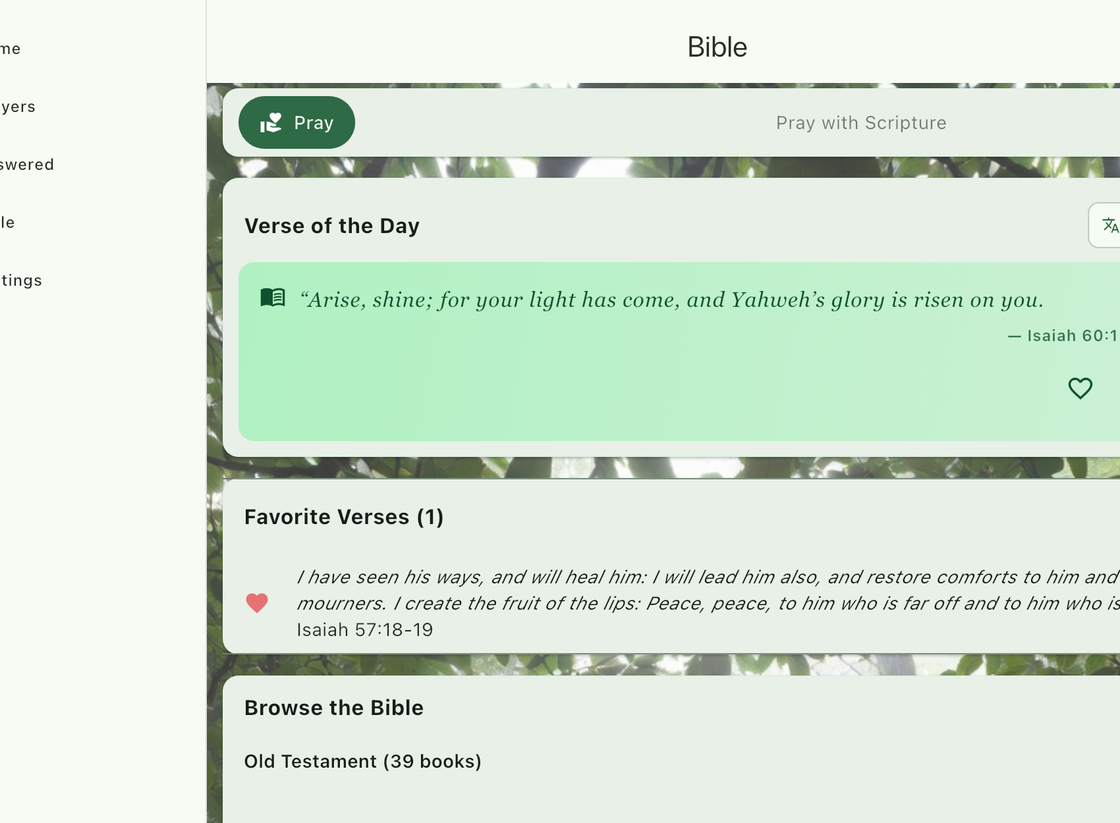
Verse of the Day
A beautifully styled card displays a featured Scripture verse each day, rendered in your chosen Scripture font. Premium users can change the Bible translation. If a non-default translation is unavailable, the app falls back to the World English Bible (WEB) with an informational note.
Favorite Verses
A list of verses you have saved as favorites. Each entry shows:
- A heart icon indicating it is a favorite.
- An italic text preview of the verse.
- The full Scripture reference (book, chapter, and verse).
Tap a favorite verse to jump directly to that chapter in the Bible reader. Swipe left on a verse to remove it from your favorites.
Browse the Bible
All 66 books of the Bible are listed under expandable Old Testament and New Testament sections. Tap a book to see its chapters, then tap a chapter to open it in the reader.
Chapter Reader
The chapter reader displays all verses with inline verse numbers, rendered in your chosen Scripture font (configurable in Settings > Appearance). If you navigated from a favorite verse, that specific verse is highlighted for easy identification.
Navigation
- Previous / Next arrows — Move between chapters.
- Chapter counter — Shows “Chapter X of Y” for the current book.
- Translation chip — Displays the current Bible translation in use.
Verse Actions
Long-press any verse in the chapter reader to access the following actions:
| Action | Description |
|---|---|
| Copy | Copies the verse text with a formatted Scripture reference to your clipboard. |
| Save to Favorites | Adds the verse to your Favorite Verses list on the Bible tab. |
| Link to Prayer | Opens a prayer picker where you can select an active prayer to link this verse to. Optionally add a note about why this verse is meaningful for the prayer. |
| Share | Shares the verse as a beautifully styled image suitable for social media or messaging. |
| Compare with WEB | Shows a side-by-side comparison of the verse in your current translation and the World English Bible. Only available when using a non-WEB translation. |
Scripture Font (Premium)
Choose a dedicated typeface for Bible text, separate from the app’s main font. The Scripture font applies to the Verse of the Day card, the chapter reader, and linked verses on prayer detail screens. Configure it in Settings > Appearance > Scripture Font. Available options:
- System
- Georgia (default)
- Merriweather
- Caveat
- Lora
- Playfair Display
- Josefin Sans